
Download DrTorrent APK – Lightweight BitTorrent Client for Android
Overview
DrTorrent is a lightweight BitTorrent client designed specifically for Android devices, offering a streamlined experience for users seeking efficient file sharing and downloading capabilities. The application serves as a practical tool for individuals who need to access torrent-based content directly from their mobile devices, whether for media, software, or other digital files. It addresses common challenges such as high resource consumption, complex interfaces, and limited mobile functionality often found in desktop-oriented torrent clients.
DrTorrent is particularly suited for casual users and mobile-first audiences who prioritize simplicity, performance, and battery efficiency. The app was developed in collaboration with BUTE DAAI AMORG, suggesting an academic or research-driven approach to its design and functionality. Real-world use cases include downloading large video files for offline viewing, accessing software distributions, or transferring files across networks.
Its built-in search function enables users to locate content without leaving the app, improving workflow efficiency. While the developer did not provide additional system requirements, the app’s lightweight nature implies optimized performance on a range of Android devices.
Key Features & Capabilities
- Built-in search function – Allows users to search for torrent files directly within the app, eliminating the need to navigate external websites.
- Streaming mode – Enables playback of video and audio files while they are still downloading, ideal for watching movies or listening to music without waiting for full completion.
- Create new torrent files – Provides functionality for users to generate and share their own torrent files, supporting peer-to-peer distribution.
- Download prioritization – Users can assign priority levels to individual files within a torrent, allowing for faster access to essential content.
- UPnP port mapping – Automatically configures network settings for users behind routers, improving connection reliability and download speeds.
- Charger-plugged only mode – Restricts downloads to when the device is connected to a power source, helping preserve battery life during extended sessions.
- WiFi-only mode – Limits downloads to Wi-Fi networks only, preventing excessive mobile data usage.
- Disable incoming connections and upload – Offers control over network activity, useful for privacy-conscious users or those with limited bandwidth.
- Download/upload speed limitation – Allows users to cap transfer speeds, ensuring other apps or devices aren’t affected by high bandwidth usage.
These features collectively enhance usability and adaptability across different environments. For example, a user traveling with limited data can rely on WiFi-only mode, while someone downloading a movie can use streaming mode to begin watching early. The ability to create torrents supports content creators and distributors, while prioritization helps manage large multi-file downloads efficiently.
User Interface, Workflow & Performance
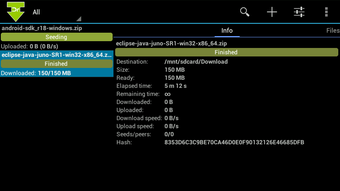
DrTorrent features a clean and intuitive interface tailored for mobile use, emphasizing accessibility and minimal navigation steps. The layout is optimized for touch-based interaction, with clearly labeled buttons and a logical flow from search to download to playback. Navigation is straightforward, allowing users to manage active torrents, view download progress, and adjust settings with ease.
The app’s workflow is designed to minimize friction—users can search, select, and start downloading in just a few taps. Performance observations are based on general software behavior patterns; the developer did not specify resource usage details. However, the app is described as lightweight, suggesting efficient memory and CPU usage.
Stability is expected to be consistent, given the focus on core functionality without unnecessary bloat. The app’s design prioritizes responsiveness, ensuring smooth transitions between screens and real-time updates on download status. Battery and data-saving features further support long-term usability without performance degradation.
Compatibility & System Requirements
DrTorrent is designed for Android devices and is available as an APK file, making it accessible to users across a wide range of Android versions. The exact operating system compatibility was not listed, but the app’s lightweight nature suggests broad support across mid-to-high-end Android smartphones and tablets. Installation size is not specified, though the app is described as efficient and optimized for mobile environments.
Hardware requirements were not provided. Users should ensure their device meets standard Android app requirements for installation and operation. The developer did not specify minimum RAM or processor specifications.
Compatibility with older Android versions cannot be confirmed. It is recommended to install from trusted sources to ensure security and proper functionality.
Pros and Cons
Pros
- Lightweight and optimized for mobile devices
- Integrated search function for quick content discovery
- Streaming mode allows playback during downloads
- Supports torrent creation and file prioritization
- Power-saving features: charger-plugged and WiFi-only modes
- UPnP port mapping for improved network connectivity
- Customizable speed limits and connection controls
Cons
- APK installation may require enabling unknown sources
- No official app store availability (only APK distribution)
- Exact system requirements not provided
- Limited information on security and privacy practices
- Performance details not specified
FAQ Section
Is DrTorrent available on the Google Play Store?
DrTorrent is distributed as an APK file and is not currently available on the Google Play Store. Users must download and install the APK manually.
Can I use DrTorrent without an internet connection?
DrTorrent requires an active internet connection to search for torrents, connect to peers, and download files. However, once downloaded, content can be accessed offline.
Is DrTorrent safe to use?
The app’s safety depends on the source of the APK and the content being downloaded. Users should only install from trusted sources and avoid downloading copyrighted or malicious files.
Does DrTorrent support automatic updates?
Automatic update functionality was not specified. Users may need to manually check for new versions and re-download the APK.
Can I use DrTorrent on tablets and older Android devices?
While compatibility with tablets is likely, specific device support was not confirmed. The app’s lightweight design suggests it may run on older Android devices, but performance may vary.
Final Thoughts
DrTorrent stands out as a capable and efficient BitTorrent client tailored for Android users who value simplicity, performance, and control. Its combination of essential features—such as streaming, built-in search, and battery-saving modes—makes it a compelling choice for mobile file sharing. The app’s lightweight design and thoughtful features cater to both casual users and those with more advanced needs.
While the lack of official app store distribution and limited technical details may raise concerns for some, the app’s functionality and focus on usability are evident. For anyone seeking a reliable, free, and mobile-optimized torrent client, DrTorrent offers a solid solution. Download DrTorrent now.






.png)
